
SOLUTION: AGENTIC AI (COMPLEX INVESTIGATION)
Newsletter – Quarterly Update Q4 2025
 datawalk
Ask the Knowledge Assistant about Newsletter – Quarterly Update Q4 2025
Get instant answers powered by Contextual Intelligence
QUARTERLY NEWSLETTER
– Q4 2025

DataWalk Integrates Agentic AI to Transform Enterprise Data Into Trusted, Actionable Insights
At DataWalk, we focus on enabling AI to augment human intelligence — not to replace it. DataWalk bridges the gap between graph intelligence, LLMs, and agentic AI.
Through our Model Context Protocol (MCP) integration, autonomous agents and LLMs can connect to the DataWalk knowledge graph and analytical environment, understand context, and perform analytical operations — from querying and reasoning to automating analytical workflows — safely and explainably.
The DataWalk platform can integrate with your existing Generative AI stack, including langchain tools and whichever LLM you prefer. Watch for the MCP Server release in the next several months.
What are your company’s plans for agentic AI? What investigative use cases are you automating? Get in touch with your DataWalk representative if you’d like to discuss these exciting developments.
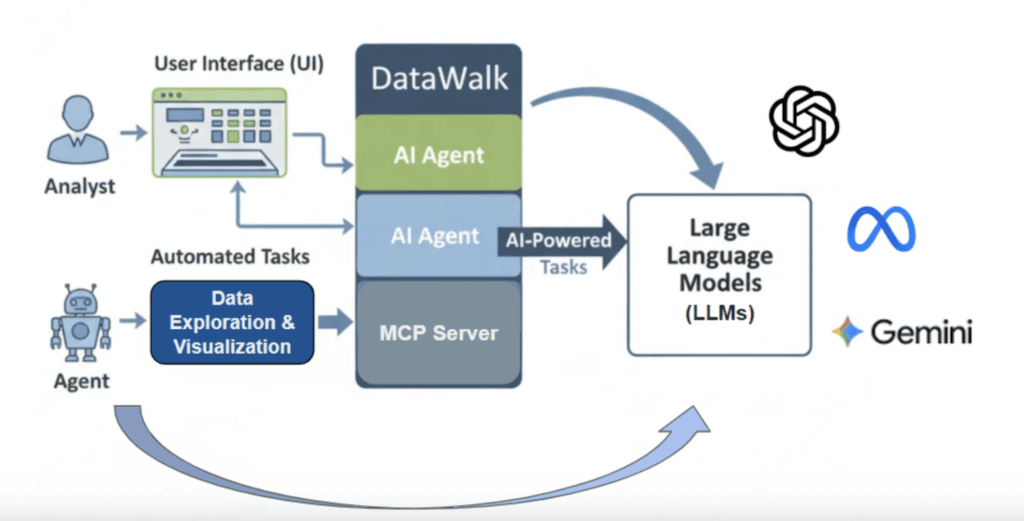
Figure 1: How DataWalk Integrates Agentic AI to Augment Human Investigations and Intelligence
DataWalk Q4 Roadmap Update
For the rest of 2025 and early 2026, our roadmap will continue to invest in AI-powered automation, expanding DataWalk’s ability to combine advanced models with human expertise to reduce repetitive investigative work while maintaining explainability and trust. At the same time, we’re delivering improvements in user experience and enterprise scalability, so the platform is not only smarter, but also easier to use and simpler to operate at scale.
Containers for Enterprise Scalability
With version 5.0, DataWalk can now run fully in containers (Kubernetes). This change makes it easier to:
- scale as data volumes and user numbers increase
- improve availability and load balancing (e.g., during peak investigative periods),
- simplify upgrades and system management for IT teams.
Non-container deployments will continue to be supported until Q4 2027, but we encourage customers to begin exploring containers at their own pace to benefit from greater performance and flexibility. Note that the upcoming version 5.1 will be the last major version update for non-container environments, with future innovations focused on containerized deployments.
Text-to-Knowledge: Faster Unstructured Data Processing
DataWalk extracts entities and relationships from unstructured data (e.g., email archives, reports, or document collections) and incorporates them into the knowledge graph automatically. With the new GLiNER model at the computation layer, tasks that previously required months of effort can now be completed in hours, with the same level of security and scalability.
As a demonstration, DataWalk processed ~146M characters, extracting 948,314 entities and 691,078 relationships—showing the system’s ability to handle large, noisy datasets quickly and efficiently.
→ Read more about unstructured data processing with DataWalk in this blog post.
Coming: Improved Usability: Browser Tabs
The DataWalk interface will move from an internal tab structure to browser-native tabs. This change will make it possible to:
- open multiple analyses side by side in separate windows
- bookmark specific link charts or other views using standard browser features,
- work more efficiently with a smoother, more flexible workflow.
This upgrade is scheduled for version 5.1, planned for Q4 2025.
Coming: AI Integrations (via MCP Server)
We are adding the ability for AI agents to query DataWalk directly. This will allow:
- easier integration with external AI tools (including your own LLMs),
- automatic summarization, reporting, and hypothesis testing
- workflows that combine AI-driven analysis with DataWalk’s trusted data.
DataWalk Platform: Tips & Tricks
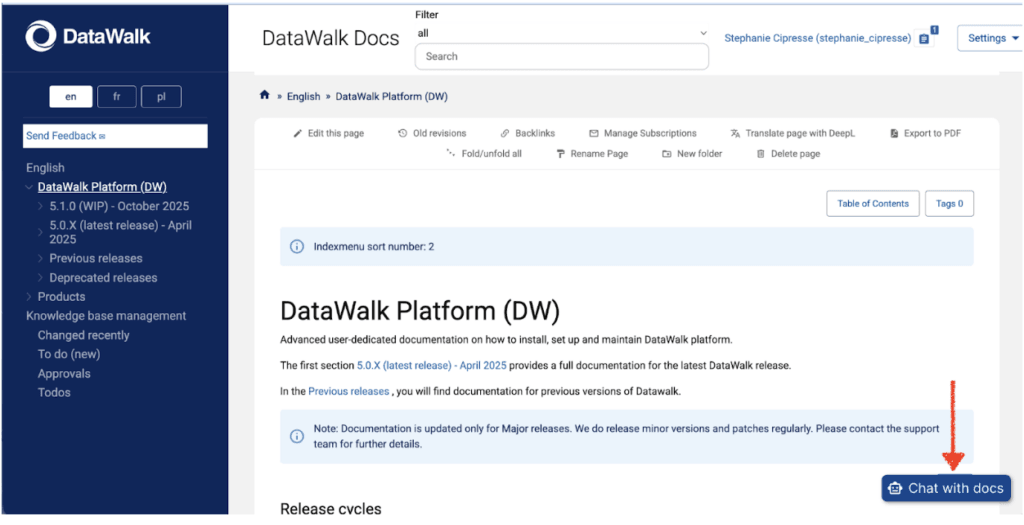
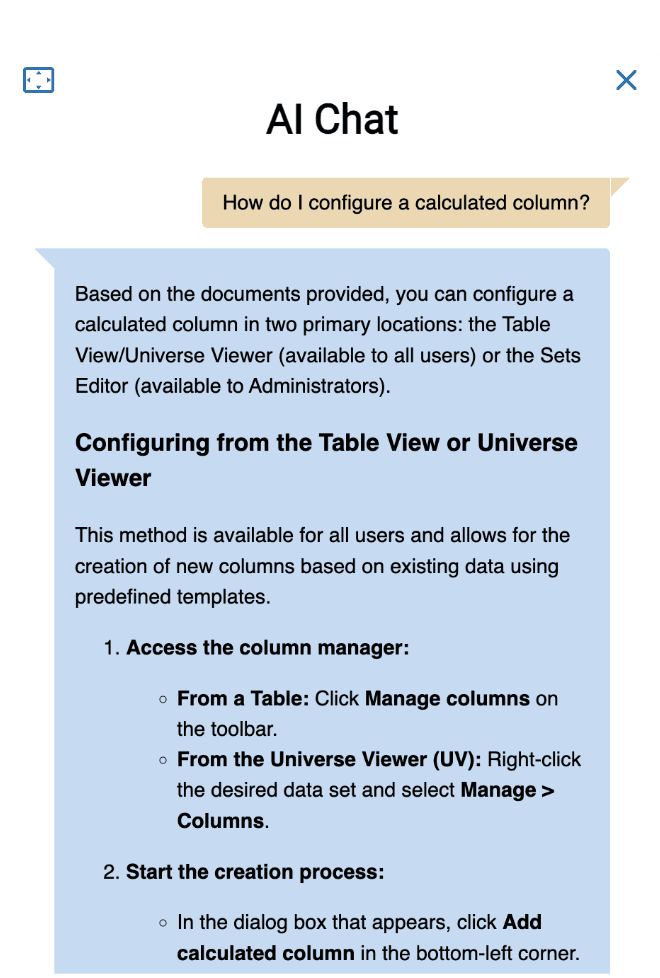
Did you know that DataWalk’s documentation on the support portal (datawalk-support.com) has a chatbot that can answer your questions about how to do almost anything in DataWalk? With specific prompts, it can even create JSON configuration files for you that you can use in DataWalk.
Try it out next time you have a DataWalk question
For DataWalk Users:
1) Keyboard shortcut for case and project selection:
Are you tired of clicking the case or project and then OK on the project or case dialog? Instead, you can just double-click on the row, and you will move forward to the next screen.
2) Three ways to select objects on a link chart:
- To select an object on a Link Chart, left-click the object.
- To select more than one object, do one of the following:
- While pressing the Ctrl key, left-click on each object you want to select.
- Click
 on the left side of the canvas to change your mouse mode and draw a box around the objects to be selected.
- To select a family of objects (defined as all objects from the same data set), you first left-click one object from that family and then press the F key.
3) Keyboard shortcut for deleting an object on a link chart:
Once you select an object on a link chart, you can right-click and find remove on the menu. Or, once you have the object selected, you can use the delete key on your keyboard to remove the object from the link chart. Either way, the object will not be removed from the system.
4) Keyboard shortcut for saving an object:
- Ctrl+Enter: This keyboard shortcut is used to save Object Folders. This was standardized to prevent accidental saves that could occur by just pressing Enter. It works for saving both new and edited folders.
See the full list of keyboard shortcuts in the DataWalk documentation here: https://docs.datawalk.com/en:admin-guides:latest_release:getting_started:hot_keys:start
For DataWalk Administrators:
1) Signouts taking your users by surprise?
The time from the last activity to session timeout is a system configuration variable set by a DataWalk system administrator. Choosing the correct timeout value means balancing security compliance against user behavior needs. Administrators can configure the user session timeout by following the instructions here:
2) How to remove a user from DataWalk
What do you do in DataWalk if a user leaves the organization? You may be tempted to remove users directly by deleting their user object, but hold up!
Deleting users via the [DW] Users set in the GUI is not supported and may lead to dependency inconsistencies.
Instead, users can be deactivated so they won’t be visible on the lists in permissions management windows. More sophisticated methods can be done via the API. Learn more here: https://your-datawalk-url/apidocs
3) How to find the ID of a set, link or column
The simplest way to find a set, column, or link ID is in a JSON editor, enter #. This will display a list of all sets, columns, and link types to which the user has access. Or if you are having trouble finding a specific one in the list, you can also find them through the UI:
- Right-click on the set in the Universe Viewer and click on the last menu item, about.
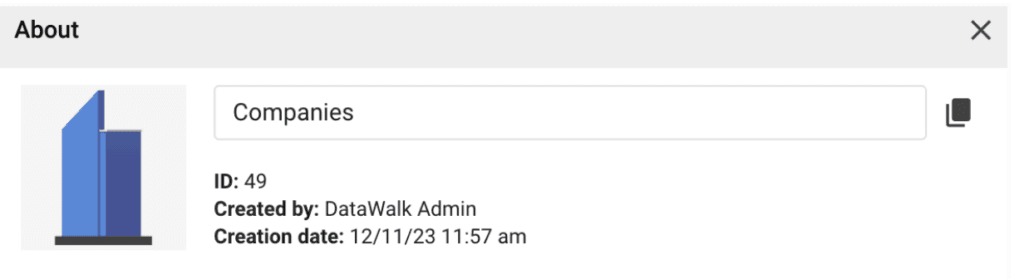
- In a table, hover over the column name to display the column ID tooltip.

- In Universe Viewer, in Object view, hover over the column name to display the column ID tooltip.
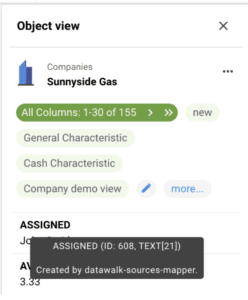
This hover capability exists in many places in DataWalk.
4) Want to speed up your support response?
The next time you ask the DataWalk support team to help troubleshoot a problem, consider sending the logs in with your first request. That way, we will have much more information and won’t have to wait for you to send them once asked. The primary method to collect logs from all services and nodes is by using the create-diag-logs.sh script.
- Log in to the installation machine using SSH.
- Navigate to the management directory:
- cd /opt/datawalk/management/ha-management
- Run the script to collect the logs: ./create-diag-logs.sh
- The collected logs will be available by default in the /opt/datawalk/logs directory.
You can then send this package directly to support.
DataWalk Platform
See DataWalk in action
Request a personalised live demo and discover how DataWalk connects the dots across your data.